A few years ago, when newspapers realized that
Google News and Craig’s List
were eating their lunch, the bean counters in charge started to cut costs.
One of the ways they did that was to slash editorial budgets.
Content is content, they said. We can share content between papers.
So that’s why you started seeing articles in your local newspaper about distant towns. Or auto ads in the classifieds for cars that were 200 miles away from you.
The bean counters were happy.
But…
…it accelerated the downward death spiral that newspapers were battling.
Some very smart and experienced people say we are looking at a deep business decline, and you should cut business costs to survive. Others say the economy will continue as it is, challenging but workable.
My own opinion (no I am not one of those very smart and experienced people, but I do monitor trends carefully) is as business owners we ALWAYS should be monitoring costs, cutting fat while not trimming the muscle that propels our businesses.
While others are cutting advertising, marketing, payroll and the muscle of their business, a smart business owner will keep their business in front of existing customers and new prospects. Day after day. Week after week.
I am of the opinion a web site is the muscle of your business, reminding your existing customers you are still around and ready to take care of them, and prospects a place to discover you exist and to learn more about you. The cost is minimal in the grand scheme of things.
Consider adding to your marketing, especially if we are approaching a downturn. AmeriWeb Hosting can help boost your web site responses. We are SEO experts. Our goal is to make your phone ring, and we’re pretty darn good at it. Call or email for more information.
Visit our BLOG for more articles like this one!
https://ameriwebhosting.com/blog/
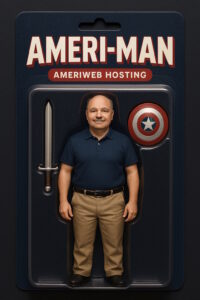
Did you ever want to know what you’d look like in a blister pack?
Introducing Ameri-Man , not coming to a store near you!
ChatGPT now lets you make an AI action figure of yourself, complete with accessories and blister pack packaging. So let your businessworkload slide for a few minutes and become that super hero we all secretly want to be. You know you want to!
Just upload a selfie, type in a prompt and boom: You’re a 1:6 scale collectible. You
can even list accessories, like sunglasses, a belt or in my case a sword and shield.
To try it, type something like: “Use this photo of me to create an action figure of myself inside a blister pack, styled like a high-end collectible toy. The figure should be standing upright with a smile. The blister packaging should say ‘[ACTION FIGURE NAME]’ and this underneath:
‘[SUBHEADING]’. Add accessories inside compartments such as: [LIST OF ACCESSORIES].”
Warning: Free users only get three prompts a day, so use them wisely. Or
turn yourself into a cowboy three times. No one’s judging.
Optimizing images
for the web is crucial for enhancing website performance. Next-gen image formats like WebP offer superior compression and quality compared to traditional formats such as JPEG and PNG. GIF less suitable for reproducing color photographs and other images with color gradients but well-suited for simpler images such as graphics or logos with solid areas of color.
Here is a breakdown of the most common image formats, their benefits and shortcomings:
- GIF introduced 1987
The Graphics Interchange Format is a bitmap image format that was developed by a team at the online services provider CompuServe led by American computer scientist Steve Wilhite and released on June 15, 1987. GIFs are suitable for sharp-edged line art with a limited number of colors, such as logos. This takes advantage of the format’s lossless
compression, which favors flat areas of uniform color with well defined edges. They can also be used to store low-color sprite data for games. GIFs can be used for small animations and low-resolution video clips, or as reactions in online messaging used to convey emotion and feelings instead of using words.
INTERESTING HISTORY: The most common pronunciations in English are with a soft g as in gin or with a hard g as in gift. This sparked an interesting debate, encompassing a wide range of participants. The disagreement over the pronunciation has led to heated Internet debate. On the occasion of receiving a lifetime achievement award at the 2013
Webby Awards ceremony, Wilhite publicly rejected the hard-g pronunciation. His speech led to more than 17,000 posts on Twitter and dozens of news articles. The White House and the TV program Jeopardy! also entered the debate in 2013. In February 2020, The J.M. Smucker Company, the owners of the Jif brand, partnered with the animated image database and search engine Giphy to release a limited-edition “Jif vs. GIF” jar of peanut butter that had a label humorously declaring the soft-g pronunciation to refer exclusively to the peanut butter, and GIF to be exclusively pronounced with the hard-g pronunciation.
- JPG (aka JPEG) introduced 1992
JPEG, short for Joint Photographic Experts Group is a commonly usedmethod of lossy compression for digital images, particularly for thoseimages produced by digital photography. The degree of compression canbe adjusted, allowing a selectable trade off between storage size and image quality. Since its introduction in 1992, JPEG has been the most widely used image compression standard in the world, and the most widely used digital image format, with several billion JPEG images produced every day as of 2015. JPEG was largely responsible for the proliferation of digital images and digital photos across the Internet and later social media. JPEG compression is used in a number of image file formats. JPEG/Exif is the most common image format used by digital cameras and other photographic image capture devices; along with JPEG/JFIF, it is the most common format for storing and transmitting
photographic images on the World Wide Web.
- PNG introduced 1994
Portable Network Graphics, officially pronounced PING, is a rastergraphics file format that supports lossless data compression. PNG was developed as an improved, non-patented replacement for Graphics Interchange Format (GIF or do you pronounce it JIF?)—unofficially, the initials PNG stood for the recursive acronym “PNG’s not GIF”. PNG
graphics are scalable, meaning they can be enlarged or shrunk with little or no loss of resolution. They also support transparent backgrounds, however their file size is often larger than other formats.
- WebP introduced 2010
Google developed the WebP image format as a modern alternative to formats like JPEG and PNG. It employs both lossy and lossless compression and supports both transparency and animations. WebP images are known for their small file sizes, which can lead to faster webpage loading times. Older (much older) browsers may not support this format, but it is supported by most modern web browsers, making it an attractive option for web developers looking to optimize image delivery and site performance. This is the industry’s preferred image format for most uses, at least until the next development comes along.
There are many other formats, most falling out of favor over time. Tiff, SVG, EPS, BMP, HEIF, RAW, PSD, AI (Adobe Illustrator) and more. Choosing the best image file format will often increase the speed your pages load, and provides other benefits to enhance your viewers’ experience.
When it comes to followers on LinkedIn, 150 is a magic number. Once you reach that many, your page will grow nine times faster than pages with fewer than 150 followers. If you run a biz, ask your employees (and everyone else you know) to follow. As you may already have discovered, growing a following on LinkedIn (or Facebook, Twitter, etc) is a long
process.
Hopefully this will help you a bit.
A beautiful website that doesn’t convert is like a Ferrari with no engine. Great to look at. Completely useless on the road.
Yet this happens all the time.
- Buttons are missing.
- Contact info is buried.
- Menus are confusing.
- And there’s no clear call to action (CTA).
- Visitors leave — because there’s no obvious next step.
- 70% of small business websites don’t have appropriate CTA on their homepage.
- Nearly half of visitors bounce, if there’s no contact information.
- That’s not a design problem.
- That’s a sales problem.
Great design doesn’t just look good. It guides visitors to the next step—
clicking the button, filling the form, making the call.
We create web sites that are logical, rank well, are attractive, and have a clear call to action. Pricing for many sites is $895, and includes a full year’s hosting free.
MY CTA: Call or email for a flyer to see what is included on our sites!
A link can be added easily, using the following code format:
<a href=”https://www.targetURL.com”>Text to display</a>
You can also have it open the linked content in a new browser, or tab using this code:
<a href=”https://www.targetURL.com” target=”blank”>Text to display</a>